
DAM migration - how to actually make the switch in 14 days
Most brands don't stay on Google Drive because it's the best tool for the job. They stay because the migration to anything better is famous for taking six months and costing $50,000. Here's why the standard migration is so painful - and how to make it take two weeks instead.
TL;DR
• Standard DAM migrations take 6-12 weeks and cost $5K-$25K in onboarding fees (more at the AEM enterprise end). It's the silent killer of DAM adoption.
• "Automated" or "one-click" migrations just copy your existing folder mess into the new DAM - Frontify's own help center admits it: "they replicate only what you already have in place."
• AI-based migration - switch from any source (Google Drive, Dropbox, SharePoint, OneDrive, Box, Bynder, Canto, Brandfolder, Frontify, Air, Pics.io, or any DAM) in 1-2 weeks by building a real taxonomy from your folder structure.
There's a pattern we see almost every week. A brand has been on Google Drive for years. The library has grown past 10,000 assets, past 50,000, past 100,000. Nobody can find anything. Freelancers are scared to upload because they'll just be told "we have that already somewhere." The marketing team has started keeping a private list of "the good shoots" in a Notion page, because the Drive is unusable.
They know they need a DAM. They've watched the demos. They've read the comparisons. They're sold on the category. And then, somewhere in the buying process, someone asks: "so how long does migration take?"
The DAM rep gives the honest answer. MediaValet's pricing guide spells it out: "Small to mid-size organizations with under 50,000 assets can typically complete implementation in 6-12 weeks, while enterprise deployments with complex integrations and hundreds of thousands of assets often require 3-6 months," with onboarding and training in the "$5,000-$25,000" range. Aprimo says implementation is typically 15-50% of your annual software cost. For Adobe AEM at the enterprise end, Brainvire's implementation-cost breakdown puts professional services at "$500,000 to over $5,000,000 for a complex, multi-site implementation."
And the project dies.
This is the silent killer of DAM adoption. It's not the price of the software. It's not feature parity. It's the migration tax - the months of work, the agency fees, the team's attention diverted from actual marketing - that makes brands give up and stay on Google Drive even though it's costing them dozens of hours a week. The DAM industry has lived with this for so long that most of it doesn't even try to solve it. We think this is the wrong answer, and most of the writeup below is about why.
If you're reading this because you've been stuck for the same reasons, here's the short version: migration doesn't have to take six months. Most teams can move from any source - Google Drive, Dropbox, SharePoint, OneDrive, Box, Bynder, Canto, Brandfolder, or any other DAM - to Tagbox.io in one to two weeks, with maybe an hour of your team's time total. The rest of this post explains why other migrations are so painful, what actually goes wrong, and how we built a different process around the problem.
Why your current system is broken (it's not your fault)
Google Drive, Dropbox, SharePoint, OneDrive, and Box are all phenomenal products. For one person organizing their own files - even a small team with a few hundred assets - the folder abstraction works beautifully. We use them ourselves.
The trouble starts somewhere between 1,000 and 5,000 assets. Past that point, the same folder model that worked for personal use breaks down for reasons that are structural, not behavioral.
You can't hold the structure in your head anymore. Once you have a few dozen - let alone a few hundred - folders and subfolders, no human can remember what lives in each one. The folder tree stops being a map and starts being a maze.
Subfolders hide. Anything nested more than two levels deep is functionally invisible. People stop browsing past a certain depth, and the assets down there effectively cease to exist - they're in the system but nobody finds them.
Each person organizes their own corner. People save their work in their own folders, named the way they think, structured the way they think. Their colleague needs the same content, doesn't know where to look, doesn't ask - and just makes a duplicate in their own folder.
Free-form names mean no taxonomy. Without an enforced tagging system, every folder name is a free-text field. One person types NY, another New York, a third NYC. One uses TikTok, another Tik Tok, a third TIKTOK. Nothing standardizes; the inconsistency compounds with every new teammate.
Different people build different hierarchies. One person organizes by Year / Product. Another by Product / Year. A third by Client / Year / Product. Same content, three incompatible structures. Searching across them - even mentally - stops being possible.
These aren't failures of your team. They're the structural limits of the folder model itself. Folder systems were designed for an era when people had hundreds of files, not tens of thousands. Past a certain scale, the tool stops being a tool and starts being a liability.
Why most DAM migrations also fail to solve this
Stacks, a DAM implementation consultancy, opens their own guide with the question they get on every project:
"'If it's just moving files from one system to another, why can't this be done in a week?' We hear this question on almost every migration project."
Their answer, also published on the same page: "A migration is not a file move. It is a data translation, restructuring, and risk management project. And that takes time." That framing - data translation - is the right one. The industry has settled on a 6-phase or 7-phase waterfall model (Discovery → Planning → Preparation → Execution → Validation → Launch → Sustainability) that takes months because every phase is happening in series, with humans driving each transition.
Here's what most DAM rollouts actually look like inside that model:
The implementation partner reads your folder structure, builds a project plan, and either (a) hires temps to manually re-tag every asset in the new DAM, which takes months and produces uneven results, or (b) runs an automated migration script that copies every folder from your Drive into the new DAM as-is.
Option (a) is what the agency fee buys you. It's not bad work - but it's slow, error-prone (different temps tag the same thing differently), and the team is locked out of the asset library for the duration. Even Bynder's own guidance admits: "For most enterprises, this phase is best completed with some support from an external DAM specialist." A vendor recommending you also pay an agency is a tell.
Option (b) is the one to watch out for. A handful of DAMs market a "one-click migration from Google Drive" or similar. It sounds great in a demo. What actually happens is your messy Drive becomes a messy DAM. Every folder transfers as a folder. Every misnamed file transfers with its misnamed name. The duplicates duplicate. The variant spellings stay as variant spellings. You now have the same broken library, but you're paying for a DAM to host it instead of Google.
The most honest acknowledgement of this we've seen comes from Frontify's own help center:
"These solutions are less costly and much faster than running a regular migration. The downside is that they allow minimal customization, so they replicate only what you already have in place."
That is the auto-migration trap, written by a vendor that ships an auto-migration product. The "fast" path replicates the mess. The "real" migration takes - by Frontify's own admission on the same page - "2-3 weeks, but often needs more time (1-2 months) to migrate all the metadata and assets while cleaning everything up."
The team logs in to the new DAM, sees the familiar mess, and stops opening it. Within three months, they're back on Google Drive. The DAM gets canceled at renewal. The brand goes back to the search and decides this whole DAM-software category doesn't work.
This is the failure mode that we built our whole migration process around avoiding.
What's actually going on inside your folder structure
.webp)
Here's the thing that nobody tells you: your existing folder structure is full of organizational signal - it's just not the signal you can directly use.
When someone on your team created the folder Christmas Party New York 2026, they encoded three different facts in that folder name:
• This is content from a Christmas Party
• It happened in New York
• It was in 2026
Those are three categories, not one folder. They're useful in dozens of combinations: "all Christmas parties," "all New York events," "all 2026 content," "all NY events in 2026," "all Christmas parties in NY," and so on. The folder structure couldn't represent any of those - every asset can only live in one folder. So your team smashed three categories into one folder name and lost the ability to query across them.
This pattern is everywhere in your Drive. Shoot - Spring Collection - Coral Pink encodes campaign + season + color. Brand A - Q4 Lifestyle - Models - Sarah encodes brand + campaign-period + asset-type + talent. 2026-03 NYC Influencer Shoot - Final encodes year + month + location + content-type + status.
The folders aren't useless. They're a compressed taxonomy that your team built incrementally over years, without realizing they were building a taxonomy. The right migration approach is to decompress that taxonomy - extract the categories your team has implicitly defined, normalize the spellings, dedupe the variants, and apply those categories as tags across every asset.
When you do this, two things happen at once:
1. Every asset becomes findable in dozens of different ways - by campaign, by season, by color, by talent, by location, by year, by month, by status, by photographer, by client - not just by where it happened to live in one folder.
2. The team can keep working the way they already work, because the categories that emerged are categories they invented. The taxonomy isn't imposed by a consultant. It's their own.
This is the actual problem that "migration" should be solving - and the auto-migration tools simply don't.
How we do it in two weeks
We've now done this for hundreds of customers across DTC brands, B2B distributors, agencies, sports organizations, beauty conglomerates, building merchants, and event production companies. The process has settled into something repeatable. Here's how it actually runs.
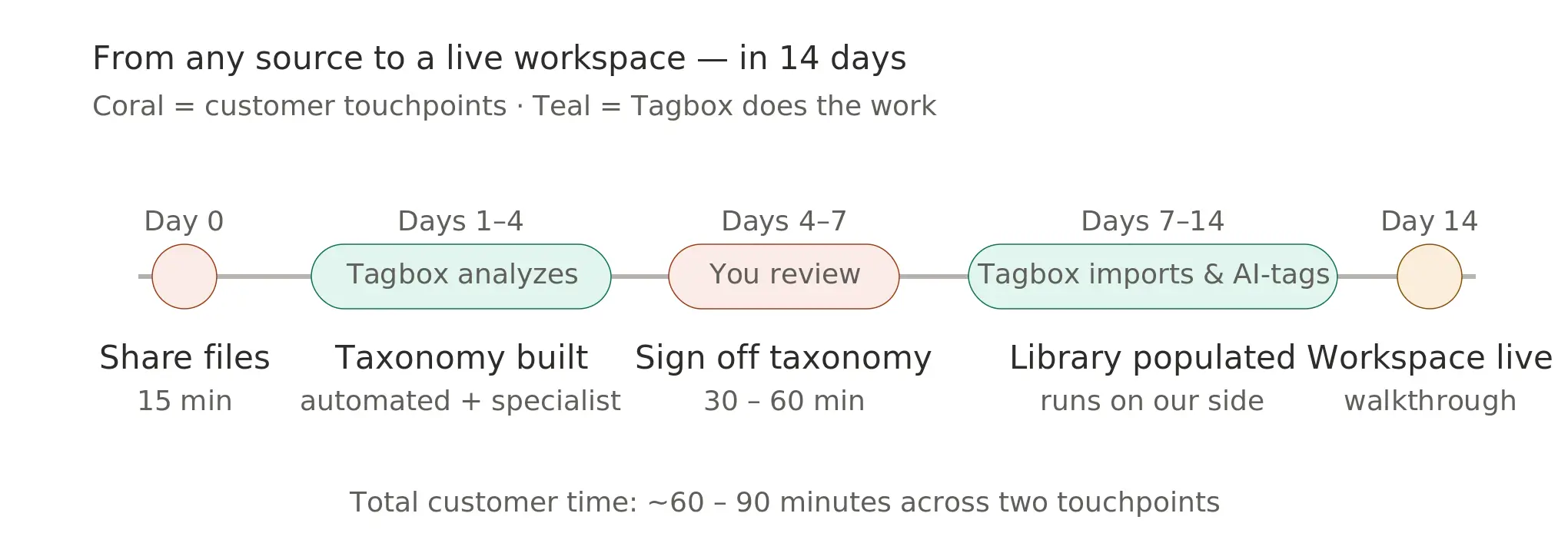
Day 0 - You share your files. You add a Tagbox.io migration user to your Google Drive, Dropbox, SharePoint, Bynder, Canto, or whatever you're on today - or you point us at an export. You tell us about any special instructions - "only assets from the past two years," "skip the _archive folder," "split into two brand workspaces," "only .psd and .mp4." About 15 minutes on your end.
Days 1-4 - We analyze. A combination of AI and a Tagbox.io specialist reads your entire folder structure. We extract every folder name, tokenize it, and identify the categories embedded in it. We look at where folders sit in the hierarchy (a Models folder under UGC / Brand A / 2026 / Fall is a different thing than a Models folder under 3D / Assets / Display). We catch variant spellings and unify them - NY and New York become one tag, Feb and February become one, TIKTOK and Tik Tok and tiktok all become TikTok. We extract person names from creator/talent paths and add them as a category. We extract structured filenames like FB_Ads_BrandName_20260410_TalentName into four tags (platform, brand, date, talent).
We surface ambiguous cases - folder names where we can't tell what category they belong to, or where the same name appears in two different contexts - and we set them aside for you to resolve.
Days 4-7 - You review. You see the proposed taxonomy. It's usually a few hundred tags organized into 5-15 categories. You spot-check it, rename anything that doesn't match how your team thinks, merge categories you want combined, split categories you want separated, and answer the disambiguation questions. "Is Sarah a model, a photographer, or a client?" "Is Aurora a campaign or a product line?" "Should HQ go under Location or Asset Type?"
Most customers finish this step in 30 to 60 minutes, in one sitting.
Days 7-14 - We import, analyze, and tag. Once you sign off on the taxonomy, we import every asset that matched your special instructions, apply the taxonomy tags based on the source folder path, preserve all original file metadata (capture date, EXIF, IPTC, color profiles, original filename), and run the assets through our content-AI layer - which auto-tags each photo and video with object recognition, scene description, text-in-image, transcripts for video, face recognition if you've turned it on, and so on.
By Day 14 - Your workspace is live. That's the commitment; many migrations finish before then. You get a walkthrough of what got imported, what the final taxonomy looks like, anything we couldn't import, and recommended next steps. Your old source stays exactly where it is - we never modify or delete anything in your original Drive/Dropbox/DAM. Most teams keep the old system running for 30-60 days as a backup, then archive it.
Total customer time: about an hour to ninety minutes, spread across two touchpoints.
A concrete example
A DTC retail customer recently came to us with a Google Drive containing roughly 30,000 assets, organized into around 8,000 folders, accumulated over four years. The folders had been created by more than a dozen different people over time. There were three different spellings of "TikTok," seven different ways to abbreviate months, and several different versions of the brand's own name (as the company had renamed itself once and different teammates typed it differently).
After migration:
• All assets imported with their full original metadata preserved.
• ~8,000 source folders compressed into roughly 200 tags across 9 categories - Brand, Campaign, Season, Asset Type, Platform, Region, Talent, Year, and Month.
• All variant spellings consolidated - one TikTok, one February, one canonical brand name.
• The customer's team finished the entire review in a single 45-minute session.
• Workspace was ready inside two weeks.
The point of the example isn't the specific numbers. It's that the messy folder structure already contained almost everything we needed to build the right taxonomy - once we extracted the categories embedded in the folder names and consolidated the variants, an unusable Drive became a searchable library. Almost no manual tagging required from anyone on the customer's team.
Jackson's, the snack brand, moved years of SharePoint folders into one clean, consolidated tag set in 10 days - read the Jackson's case study.
What other DAMs actually offer (and what their own pages say)
Almost every major DAM markets some form of migration help. The marketing copy is usually upbeat. The help-center pages and pricing footnotes tell a different story - one you can read for yourself. We pulled the published material from the biggest names in the category:
Pics.io - "We offer smooth and super-easy data migration from all kinds of cloud storage, including Google Drive, Dropbox, Amazon S3, and more. With our migration feature, what once felt like chaos will quickly turn into organized bliss." (source). What it actually is: a sales-call professional-services engagement - you have to email sales@pics.io for a quote, with no published timeline or price. "Super-easy" for the customer means "easy because we charge you to do it manually."
Frontify - markets a Google Drive Migration integration as "quick, fully automated, and managed by Frontify… no need for Google Drive or IT involvement." What it actually is: listed as a Paid Integration restricted to the Enterprise plan. Their own help center (quoted in the previous section) admits the automated path "replicate[s] only what you already have in place" and the real migration takes 1-2 months.
Canto - "Canto makes it easy to migrate your digital assets from Google Drive directly into your main library. Once Admins connect to Google Drive, users can choose which folders to bring over. Plus, all of the metadata included in the files will be migrated as well." (source). What it actually is: a folder-sync connector. Brings over folders + filenames + EXIF as-is. No AI tagging, no taxonomy build, no consolidation of variants. You import the same flat mess you started with.
Bynder - their Media Import documentation describes large migrations as requiring customer-prepared "import sheets" in batches of "no more than 50,000 assets" each, "split into multiple sheets if you have more assets." What it actually is: the customer is doing the data-translation work - building the import manifests in spreadsheet form. Bynder's enterprise case study highlight is Bouclair migrating 85,000 assets in two weeks - published as a notable exception, not a baseline.
Brandfolder (Smartsheet) - their SFTP Ingestion documentation describes the migration path as "Customers with Core and Premium plans who purchased Self-Assisted Asset Migration Services during onboarding can use SFTP Ingestion functionality." What it actually is: migration is a paid add-on on top of the subscription. "Self-Assisted" means you still drive it.
Air.inc - "Migration is straightforward with Air's drag-and-drop tools, pre-built templates, and dedicated onboarding support." What it actually is: custom migration with metadata preservation gated to enterprise plans, agency-led ("your enterprise success manager helping guide you through the process").
The pattern is consistent: either the migration is self-serve and just copies your existing mess into a new system, or it's a paid agency-led project where the customer drives the prep work. Almost no one in the category does what we do - build a taxonomy from your existing structure, included in the standard subscription, in 1-2 weeks.
If you're already shortlisting against one of these vendors, the head-to-head pages may help: Tagbox vs Bynder · vs Brandfolder · vs Canto · vs Air · vs Pics.io.
When is it time to leave?
Check anything that's true. Three or more means the folder system has stopped earning its place.
☐ Your library is past roughly 100 folders, with 3,000-5,000+ media files
☐ The same shoot lives in multiple folders under different names
☐ NY vs New York vs NYC - variant spellings everywhere
☐ Finding a specific asset takes real time
☐ It's hard to get assets from freelancers or share back cleanly
☐ The "gatekeeper" syndrome - one person knows where everything is
☐ A busy #where-is-this Slack / Teams channel
☐ A private "good shoots" list in Notion (or in your head)
☐ You've re-shot things you're pretty sure you already own
☐ Nervous about giving new hires full library access
☐ Can't confidently delete anything - the "delete later" pile keeps growing
3+ checked? The folder system has stopped earning its place. Time to move.
None of these problems are solved by a better folder structure. They're solved by tags, search, AI, permissions, and a library built for content - which is what a DAM is. The migration is the bridge.
What to ask any DAM vendor about migration
If you're shopping for a DAM and want to avoid the migration trap, ask every vendor the same five questions before signing:
1. Do you do the migration, or do I? If they say "you do it, but here's a tutorial," expect months of your team's time. If they say "our partner does it," expect a five-figure quote. If they say "we do it," keep going.
2. Do you charge extra for migration? Many vendors charge migration as a separate line item, sometimes more than the first year of subscription. Find out before you sign.
3. Do you build a real taxonomy from my folder structure, or just copy the folders over? If it's the latter, you'll get a DAM that looks just like your Drive. Don't pay for that. (As Stacks puts it, "the most expensive migrations are rarely the largest ones. They are the ones that were under-scoped at the beginning.")
4. How long does the full migration take from start to ready-to-use? If the answer is more than four to six weeks for a library under a million assets, ask what the bottleneck is. It's usually that the team is doing manual work that could be automated, or automated work that should be reviewed by a human.
5. What's the customer time commitment? You want this number to be measured in hours, not weeks. If a vendor's migration requires multiple full days of your team's time, that's an internal-cost line item you should price in.
We've tried to make Tagbox.io's answer to all five of these the answer we'd want as a buyer ourselves: we do it; it's included in every plan; we build the taxonomy; one to two weeks; and your team needs about an hour total.
FAQ
How long does a DAM migration take in 2026?
Industry baselines from MediaValet, Aprimo, and Frontify put a standard migration at 6-12 weeks for under-50k-asset libraries, 3-6 months for enterprise, with the "automated" alternatives explicitly described as replicating your existing folder mess. Tagbox.io migrations finish in 1-2 weeks regardless of source - Google Drive, Dropbox, SharePoint, OneDrive, Box, or another DAM - because the taxonomy-build step is automated against your folder structure rather than driven manually by an agency.
What's wrong with a "one-click" or "automatic" DAM migration?
One-click migrations copy your folders into the new DAM as-is. Every misnamed file keeps its name; every variant spelling (NY / New York / NYC) stays as a variant; every duplicate stays a duplicate. You end up paying for a DAM to host the same broken library. Frontify's own help center is the clearest acknowledgement: "They replicate only what you already have in place." A real migration extracts the taxonomy embedded in your folder names and applies it as structured tags.
Do DAM vendors charge extra for migration?
Most do, and the line item is usually larger than the first year of subscription. MediaValet lists onboarding and training at $5,000-$25,000. Aprimo says implementation runs 15-50% of annual software cost. Adobe AEM enterprise implementations run $500,000 to over $5,000,000. Brandfolder gates self-assisted migration to a paid add-on. Frontify gates its automated Google Drive integration to the Enterprise plan as a Paid Integration. Tagbox.io is the unusual one: migration is included in every plan.
Can I migrate from Google Drive, Dropbox, SharePoint, OneDrive, or Box to a DAM?
Yes. The process is the same for all of these: you grant the DAM read access to the source (or send an export), the DAM reads the folder structure, builds a taxonomy from it, imports the assets, and applies the tags. The differences between sources are mostly cosmetic - folder hierarchy semantics vary slightly, and SharePoint has metadata fields some other sources don't - but the migration approach is identical.
Can I migrate from one DAM to another (Bynder, Brandfolder, Canto, Frontify, Air, Pics.io)?
Yes. DAM-to-DAM migration is technically simpler than from Drive - DAMs already have structured tag fields, so we can map them directly into Tagbox.io tags rather than parsing folder names. Most DAM-to-DAM migrations actually finish faster than Drive-to-DAM, because the source already has cleaned data. The barrier is usually export - some DAMs make exporting your own assets harder than it should be - but every major DAM in 2026 supports either an API export or an admin bulk-download.
Will my original Google Drive (or Dropbox / SharePoint / old DAM) be modified or deleted?
No. We never write to, modify, or delete anything in your source system. The migration is read-only on the source side. Your original library stays exactly as it is until you choose to archive or delete it yourself. Most teams keep the old system running for 30-60 days after the new workspace goes live as a backup, then turn it off.
How much of my team's time does the migration actually take?
Across hundreds of migrations, the typical customer spends about 60-90 minutes total. Roughly 15 minutes at the start (share access, specify any special instructions) and 30-60 minutes mid-process to review the proposed taxonomy, rename anything that doesn't match how your team thinks, and resolve disambiguation questions ("is Aurora a campaign or a product line?"). After that, the import and AI-tagging steps run on our side without you.
What if my library is huge - hundreds of thousands of assets?
The 2-week window is the commitment for typical mid-market libraries (5,000-100,000 assets). Larger libraries take longer in the import phase but not in the taxonomy-build phase, because the taxonomy work scales with folder count, not asset count. A 500,000-asset library with 10,000 folders builds its taxonomy in the same time as a 50,000-asset library with 10,000 folders. For libraries over a million assets, contact hello@tagbox.io for a scoped timeline - typically 2-4 weeks for the workspace to be live with full import running in the background.
Sources
Every cost and timeline figure cited above is pulled from a public vendor page. Last verified June 2, 2026.
• MediaValet - DAM pricing guide
• Aprimo - How much does a DAM cost?
• Brainvire - Adobe AEM cost breakdown
• Stacks - DAM Migration guide
• Bynder - 3 steps to DAM migration
• Bynder - Media Import documentation
• Bynder - Customer stories (Bouclair)
• Frontify - Automatic migrations (help center)
• Frontify - Google Drive Migration integration
• Pics.io - Data migration services
• Canto - Google Drive integration
• Brandfolder (Smartsheet) - SFTP Ingestion
See also
• A migration in practice: How Jackson's moved from SharePoint to Tagbox.io in 10 days.
• The complete category comparison: The DAM Comparison Guide - Tagbox.io's full grid of 11 DAMs across 50+ features.
• For smaller libraries on a budget: Affordable Digital Asset Management under $500.
• The AI layer that runs after migration: Custom AI Tagging - train AI on your specific products, venues, or design elements.
• Tagbox vs the major DAMs: vs Bynder · vs Brandfolder · vs Canto · vs Air · vs Pics.io · vs AEM.
If you're ready
We do the migration. It's included on every plan - no separate line item. We build a real taxonomy from your folder structure, not a one-to-one copy. One to two weeks; about an hour of your team's time.
Start a trial or email hello@tagbox.io to scope your specific source.
The migration tax is real. We just stopped charging it.
gimme more!
Sign up to get the latest stories about Creative Teams and how they work, straight to your inbox.