
Everything you need to know about collecting, organizing, and sharing event photos at scale - from face recognition and AI tagging to sponsor galleries and long-term searchability.
Last updated September 2026
The first challenge is getting all the photos into a single library. Photographers deliver files through Google Drive links, WeTransfer emails, or memory cards. Attendees may be capturing moments on their phones. Sponsor teams might have their own photographers. Without a central collection point, someone on your team ends up downloading files from five different platforms, renaming folders, and re-uploading everything into whatever system you're using. That's hours of work before you've even started organizing.
Upload links let photographers and attendees contribute photos directly to your event library without needing an account or special software. A photographer finishes a session, opens a link, and uploads their batch. An attendee captures a great moment on their phone, scans a QR code at the venue, and uploads it right there.
The key is that every photo - from every source - lands in one central library with automatic organization applied on arrival. No downloading from one platform and re-uploading to another. No manual sorting into folders. No renaming files.
This matters because the faster photos land in your system, the faster you can start sharing them. If photographers are uploading during the event, attendees can start finding their photos before they even leave the venue.
Best for: Corporate events and galas | Conferences | Sporting events | Festivals
This is the single most important capability in event photo management. Finding photos of a specific person - a VIP guest, a keynote speaker, your client's CEO - is nearly impossible when you're staring at thousands of thumbnails in a Dropbox folder. And sharing personalized photo galleries with guests? That doesn't happen without automation.
Face recognition changes everything.
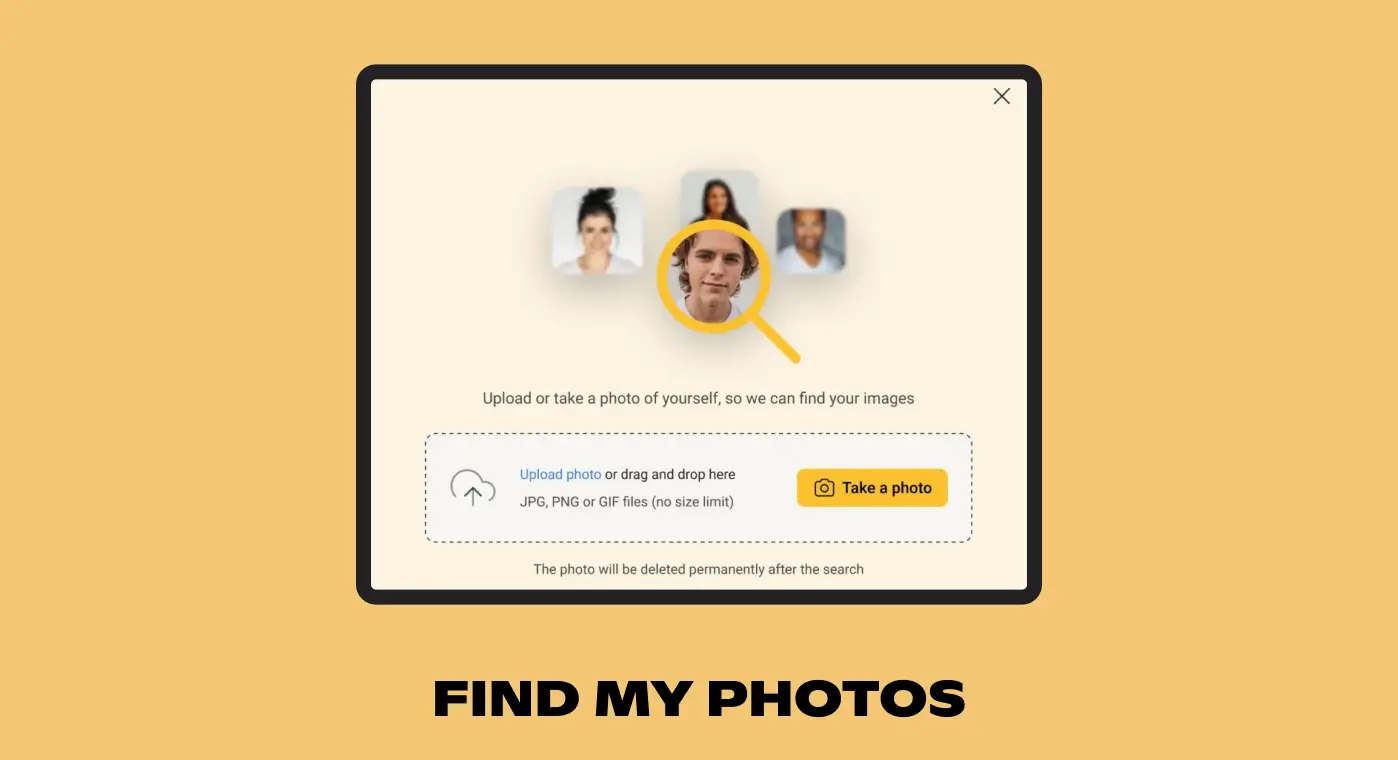
Upload a photo of someone - or let them take a selfie - and instantly surface every image they appear in. At a corporate gala with 4,000 photos, a guest goes from "scroll through everything and hope" to "here are your 23 photos" in seconds.
The need for face recognition depends more on the type of event than the size. A 50-person gala where the host wants to send each guest a personal thank-you gallery needs face recognition just as much as a 2,000-person conference. It's about the kind of engagement you want to create.
That said, scale adds a layer of complexity. At smaller events, some teams manage to sort photos manually - it takes time, but it's doable. Once you're past a few hundred attendees and several thousand photos, manual sorting simply stops being realistic. And at large-scale events with thousands of guests, you need more than just basic face recognition - you need automation that handles batch processing, auto-grouping, and self-service delivery without someone on your team manually curating each gallery. Even setting up something like Google Photos for this purpose falls apart at scale; it's just not built for hundreds or thousands of guests.
The signature use case: place a QR code at the event venue. Guests scan it, take a selfie (or upload a headshot), and instantly see a personal gallery of every photo they appear in. They download their favorites, share on social media, tag the event - all while the event is still fresh.
Best for: Corporate conferences | Nonprofit galas | Sporting events
For events where you know the key people in advance - keynote speakers, C-suite executives, board members, top donors - you can pre-load their faces before the event starts. Every photo of them is automatically collected as it's uploaded, without requiring them to take a selfie.
DMCs (Destination Management Companies) like Imprint Group or Elevoque use this for multi-day client programs - the client's leadership team and their guests are automatically found in the photos from every session and dinner. Speakers at corporate conferences get curated galleries of their appearances ready to share within hours.
Best for: DMC programs | Corporate conferences | Award ceremonies
For social events like weddings, galas, and community celebrations, face recognition can group couples and families together. Instead of each person getting their own separate gallery, they share one that includes every photo any of them appears in.
Best for: Weddings | Galas | Community celebrations
Best for: Corporate conferences | Nonprofit galas | Sporting events
For events where you know the key people in advance - keynote speakers, C-suite executives, board members, top donors - you can pre-load their faces before the event starts. Every photo of them is automatically collected as it's uploaded, without requiring them to take a selfie.
DMCs (Destination Management Companies) like Imprint Group or Elevoque use this for multi-day client programs - the client's leadership team and their guests are automatically found in the photos from every session and dinner. Speakers at corporate conferences get curated galleries of their appearances ready to share within hours.
Best for: DMC programs | Corporate conferences | Award ceremonies
For social events like weddings, galas, and community celebrations, face recognition can group couples and families together. Instead of each person getting their own separate gallery, they share one that includes every photo any of them appears in.
Best for: Weddings | Galas | Community celebrations
Best for: Corporate conferences | Nonprofit galas | Sporting events
For events where you know the key people in advance - keynote speakers, C-suite executives, board members, top donors - you can pre-load their faces before the event starts. Every photo of them is automatically collected as it's uploaded, without requiring them to take a selfie.
DMCs (Destination Management Companies) like Imprint Group or Elevoque use this for multi-day client programs - the client's leadership team and their guests are automatically found in the photos from every session and dinner. Speakers at corporate conferences get curated galleries of their appearances ready to share within hours.
Best for: DMC programs | Corporate conferences | Award ceremonies
For social events like weddings, galas, and community celebrations, face recognition can group couples and families together. Instead of each person getting their own separate gallery, they share one that includes every photo any of them appears in.
Best for: Weddings | Galas | Community celebrations
Most event photo workflows stop at delivery. Photos get shared with attendees in the week after the event, and then they vanish into an archive folder that nobody opens again.
This is a massive waste. Event photos are some of the most valuable marketing content a company produces - real people, real moments, real energy. But only if you can find them six months later when you need them.
Ask anyone on an event team to find "that photo of the keynote speaker from the September conference, the one where they're standing next to the sponsor banner" and watch what happens. They open a folder called "Fall Conference 2025," scroll through thousands of thumbnails, give up after 20 minutes, and either shoot something new or skip the photo entirely.
The problem isn't storage. It's findability.
A properly organized event photo library lets anyone on the team search using natural descriptions - "keynote speaker at podium," "outdoor networking reception," "group photo with sponsor banner" - and get results in seconds. No folder diving. No remembering filenames.
AI tagging at upload makes this possible. Every photo gets analyzed and tagged automatically - people, objects, scenes, actions, text visible in the image. This happens in the background with no manual effort.
But AI tagging alone isn't enough. A lot of the most important information about an event photo isn't visible in the image itself. Things like:
This is off-asset metadata - information that needs to be tagged consistently so you can search across events later. When your September conference and your January kickoff use the same tagging structure, you can search across both simultaneously. "Find all outdoor networking photos from the past year" returns results from every event, not just the one you happen to remember the folder name for.
Event companies like Blueprint Studios and HGV (one of our largest sporting event customers) rely on long-term libraries to fuel proposals, social media, and sponsor reporting year-round.
Best for: Event production companies | DMCs | Corporate marketing teams
Sponsors pay for visibility. They want proof that their brand appeared throughout the event - on banners, signage, stage backdrops, table settings, and branded activations. Traditionally, someone on the event team manually scrolls through every photo looking for sponsor logos, then assembles a report. For an event with five sponsors and thousands of photos, this can take an entire day.
AI-powered logo detection scans every event photo and identifies brand logos automatically. Each sponsor gets an auto-generated collection of every photo where their logo appears - on stage, at their booth, on attendee swag, in the background of networking photos.
This means:
Best for: Corporate conferences | Trade shows | Sporting events
Generic AI tagging handles standard objects, scenes, and people well. But some event types need recognition that goes beyond what off-the-shelf AI provides.
Custom AI training teaches the system to recognize things specific to your business - rental inventory, proprietary stage designs, specific product lines, venue zones, or themed decorations.
Event rental and design companies are a perfect example. Companies like Modern Event Furniture and Hensley Event Resources manage thousands of photos showing their furniture, decor, and staging setups across hundreds of events. They need to find "that gold Chiavari chair setup from the hotel ballroom event" or "the modern lounge configuration we did for the tech launch." Generic AI sees "chairs" and "room." Custom AI sees "gold Chiavari, banquet configuration, ballroom setting" - the actual language their sales team uses when putting together proposals.
Other advanced use cases:
Best for: Event rental and design companies | Multi-venue operators | Conference series organizers
Not all platforms are built for the realities of event photo management. Dedicated event photo-sharing tools like SpotMyPhotos, Waldo, GUESTPIX, or Memzo can handle basic delivery - getting photos to attendees after an event. But if you need more than one-time sharing, the gaps show up fast: no long-term library, no cross-event search, limited or no video support, and no way to correct errors in face recognition or tagging.
On the other end, traditional DAM platforms like Canto, Brandfolder, or Bynder handle long-term storage well but weren't built for event workflows. They lack face recognition delivery, upload links for photographers and attendees, and the kind of real-time processing that events demand.
What you actually want is a platform that handles both - fast, personalized photo delivery during and after the event, and a permanent, searchable media library for everything that comes after. Specifically:
Tagbox.io is built to cover both sides of this equation. Event companies like Blueprint Studios, Imprint Group, IFMA World, and HGV use it for AI-powered face recognition delivery, upload links, sponsor logo detection, custom AI tagging, and a permanent media library with semantic search and multi-language support. Photos captured at this month's conference are instantly searchable for next quarter's sales proposals - no migration, no re-uploading, no separate systems.
Event photo management is the process of collecting, organizing, delivering, and archiving photos from live events. It covers everything from gathering photos from multiple photographers and attendees, to making them searchable, to sharing personalized galleries with guests, and storing them for long-term reuse in marketing and sales materials.
Face recognition AI detects and analyzes faces across all event photos, then groups them by individual. When a guest uploads a selfie or reference photo, the system matches their face against every photo in the library and surfaces a personal gallery of images they appear in.
AI event photo management uses computer vision, face recognition, logo detection, and custom-trained AI models to automate the tagging, sorting, and delivery of event photos. Instead of someone manually scrolling through thousands of images, AI handles it in minutes.
Event photo sharing tools focus on fast delivery. DAM platforms focus on long-term organization, searchability, and team collaboration. Most event teams need both. Some platforms, like Tagbox.io, combine both capabilities in a single system.
Face recognition-powered personalized galleries are the most effective method. Place a QR code at the venue linking to a Find My Photos page. Each attendee takes a selfie and instantly sees only the photos they appear in.
As fast as possible. Event photos are most valuable while the event is still happening or immediately after. With real-time uploading and AI-powered processing, photos can be available in personalized galleries during the event itself.
AI-powered logo detection scans every event photo and identifies brand logos automatically. Each sponsor gets a curated collection of every photo featuring their branding, replacing hours of manual photo review.
